📂 Art 👁 1.7k views 🕐 June 7, 2026

Photopea

Photopea is an online photo editor that allows users to edit photos,.

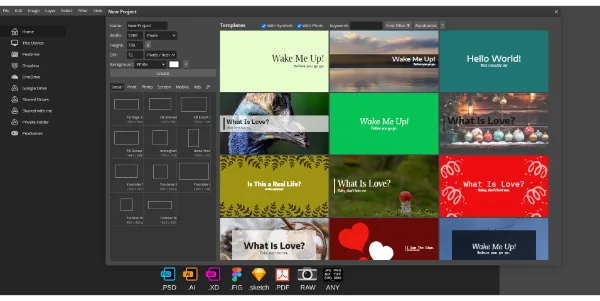
Photopea is an online photo editor that allows users to edit photos, apply effects, filters, add text, crop or resize pictures directly in their browser for free. It is designed for freelancers, designers, and anyone who needs to produce professional-quality work without the need for expensive software. Photopea supports over 40 file formats, including PSD, and offers a range of editing tools from basic to advanced. With Photopea, users can transform their photos with professional-grade tools, design promotional materials, edit product photos, and create engaging content for their website or online store. The tool is particularly useful for educational projects, allowing students and teachers to create stunning visuals for presentations and assignments. Photopea's ability to open and edit various file formats, including RAW files, and its support for vector graphics make it a versatile tool for designers and photographers.

Art Avatars Business Ai
Features
Layering
allows users to work with multiple layers, making it easier to edit complex images.
Filter and Effects
offers a range of filters and effects to enhance and transform photos.
Text Editing
enables users to add text to their images, with options for font, size, and color.
RAW File Support
allows users to open and edit RAW files from various camera models.
Verdict
Best forTeams doing Art work who need consistent output without a steep learning curve.
Skip ifYou only need this once or twice; the subscription cost won't pay off for occasional use.
Free to use, with no need for expensive software or downloads.
Supports over 40 file formats, including PSD, making it a versatile tool for designers and photographers.
Offers advanced editing tools, such as layering, masking, and blending, to produce professional-quality work.
May not be suitable for users with low-end hardware, as it relies on the device's CPU and GPU for processing.
Limited to online use, which may not be ideal for users who prefer offline editing or have limited internet access.
Alternatives
ToolPricingUpvotesRating
Read AI Freemium ▲ 112 3.7
BigIdeasDB Freemium ▲ 315 3.5
Juice AI Freemium ▲ 280 4.1
Frequently Asked Questions
Photopea is an online photo editor that allows users to edit photos directly in their browser for free. It supports over 40 file formats and offers a range of editing tools from basic to advanced.
Yes, Photopea is completely free to use, with no tiered pricing or paid upgrades. It is supported by ads and does not require any downloads or installations.
Yes, Photopea can be used for commercial purposes, such as editing product photos for an e-commerce business or creating graphics for a freelance design project.
Photopea offers many of the same features as paid photo editing software, but is completely free and accessible online. It is a great option for those who need to edit photos but do not want to pay for expensive software.
Yes, Photopea is suitable for beginners, as it offers a range of basic editing tools and features that are easy to use and understand. It is also a great option for those who are new to photo editing and want to learn the basics without committing to expensive software.
Reviews
📝
No reviews yet
Be the first to share your experience with Photopea.
Submit a Review

Your email address will not be published. Required fields are marked *

Photopea
Photopea
Freemium
Visit Site ↗
Home Prompts