📂 Art 👁 2.7k views 🕐 June 10, 2026

insMind AI Image Enhancer

The insMind AI Image Enhancer is a tool designed for individuals and.

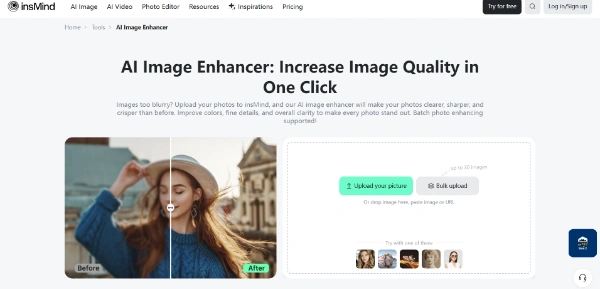
The insMind AI Image Enhancer is a tool designed for individuals and professionals looking to improve the quality of their images. It is particularly useful for those who need to enhance photos for professional use, such as designers, developers, and e-commerce retailers. The tool allows users to remove blur, sharpen edges, and improve the overall quality of their images, making it an essential asset for anyone looking to produce high-quality visual content.

The insMind AI Image Enhancer works by using advanced AI algorithms to analyze and enhance the details of an image. It can upscale images to 2K, 4K, or 8K resolution, remove noise and blur, and even restore old and damaged photos. The tool is easy to use, with a simple upload and enhance process that requires no manual editing skills. It also allows users to enhance multiple photos at once, making it a time-saving solution for those who need to process large numbers of images.

The insMind AI Image Enhancer is particularly valuable for professionals who need to produce high-quality images for their work. For example, designers can use the tool to enhance product images for their clients, while e-commerce retailers can use it to improve the quality of their product photos. The tool is also useful for individuals who want to restore old family photos or enhance their personal photos for social media. Overall, the insMind AI Image Enhancer is a powerful tool that can help anyone improve the quality of their images and produce professional-looking results.

Art Avatars Business Ai
Features
Remove blur and sharpen edges
The insMind AI Image Enhancer can remove blur and sharpen the edges of an image, making it look clearer and more defined.
Upscale images to 2K, 4K, or 8K resolution
The tool can upscale images to higher resolutions, making them suitable for professional use.
Restore old and damaged photos
The insMind AI Image Enhancer can restore old and damaged photos by removing noise and blur and improving the overall quality of the image.
Enhance multiple photos at once
The tool allows users to enhance multiple photos at once, making it a time-saving solution for those who need to process large numbers of images.
Verdict
Best forTeams doing Art work who need consistent output without a steep learning curve.
Skip ifYou only need this once or twice; the subscription cost won't pay off for occasional use.
Easy to use: The insMind AI Image Enhancer is easy to use, with a simple upload and enhance process that requires no manual editing skills.
Time-saving: The tool allows users to enhance multiple photos at once, making it a time-saving solution for those who need to process large numbers of images.
High-quality results: The insMind AI Image Enhancer can produce high-quality results, making it a valuable tool for professionals and individuals alike.
Limited control over enhancement settings: The insMind AI Image Enhancer has limited control over enhancement settings, which may not be suitable for all users.
Dependence on AI algorithms: The tool's effectiveness depends on the quality of its AI algorithms, which may not always produce the desired results.
Alternatives
ToolPricingUpvotesRating
Read AI Freemium ▲ 112 3.7
BigIdeasDB Freemium ▲ 315 3.5
Juice AI Freemium ▲ 280 4.1
Frequently Asked Questions
The insMind AI Image Enhancer is a tool that uses AI algorithms to enhance the quality of images, removing blur and sharpening edges, and upscaled to 2K, 4K, or 8K resolution.
The insMind AI Image Enhancer works by analyzing and enhancing the details of an image using advanced AI algorithms, requiring no manual editing skills.
The benefits of using the insMind AI Image Enhancer include easy to use, time-saving, and high-quality results, making it a valuable tool for professionals and individuals alike.
The insMind AI Image Enhancer offers a free online service to upgrade photos to 8K resolution in one click, but the pricing details for other services are not explicitly stated.
The alternatives to the insMind AI Image Enhancer are not explicitly stated, but other AI image enhancers and photo editing tools may offer similar services and features.
Reviews
📝
No reviews yet
Be the first to share your experience with insMind AI Image Enhancer.
Submit a Review

Your email address will not be published. Required fields are marked *

insMind AI Image Enhancer
Freemium
Visit Site ↗
Home Prompts