EZTrimmer
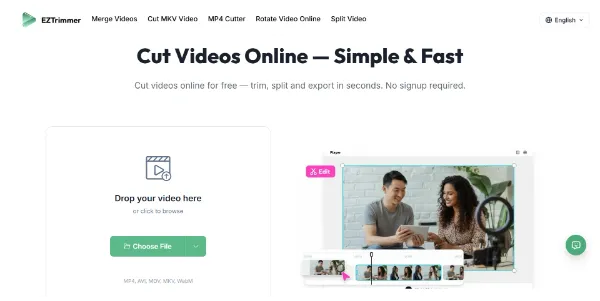
EZTrimmer is a professional 3-in-1 tool designed to cut, trim, and split.
EZTrimmer is a professional 3-in-1 tool designed to cut, trim, and split videos online for free, catering to creators and professionals who need a simple and fast solution for video editing. It supports various video formats, including MP4, AVI, MOV, MKV, and WebM, allowing users to upload files up to 500MB and 30 minutes long. The tool is ideal for those who want to cut videos without downloading heavy software or dealing with watermarks and ads. EZTrimmer's intuitive timeline enables precise cutting, and its secure environment ensures user privacy by automatically deleting files after processing.
Edition Video
Last Ia
Meilleurs Agents Ia
Visit Official Site
Freemium
Upload and Cut
Upload your video file and cut it into the desired length or format.
Precise Trimming
Use the intuitive timeline to trim your video with frame-accurate precision.
Format Support
EZTrimmer supports all major video formats, including MP4, AVI, MOV, MKV, and WebM.
Secure Processing
All video processing happens in a protected environment, ensuring user privacy and security.
✓EZTrimmer is completely free to use, with no hidden fees or watermarks on exported videos.
✓The tool is very easy to use, even for beginners, with a simple drag-and-drop interface.
✓It supports a wide range of video formats, making it versatile for different needs.
✕The file size limit is 500MB, which might not be sufficient for larger video files.
✕There is no option for advanced video editing features beyond cutting, trimming, and splitting.
| Tool | Pricing | Upvotes | Rating |
|---|---|---|---|
 Read AI
 |
Freemium | ▲ 112 | ★ 3.7 |
 BigIdeasDB
 |
Freemium | ▲ 315 | ★ 3.5 |
 Juice AI
 |
Freemium | ▲ 280 | ★ 4.1 |
EZTrimmer is an online video trimmer that allows you to cut, trim, and split videos in seconds. It's free, easy to use, and supports various video formats.
Yes, EZTrimmer is completely free to use, with no hidden fees, no credit card required, and no watermarks on exported videos.
EZTrimmer supports all major video formats, including MP4, AVI, MOV, MKV, and WebM.
EZTrimmer processes your videos in a protected environment, ensuring user privacy and security by automatically deleting files after processing.
While EZTrimmer is a unique tool, alternatives may include other online video editors or desktop software that offer similar features, but may have limitations such as watermarks, ads, or paid subscriptions.
📝
No reviews yet
Be the first to share your experience with EZTrimmer.
Submit a Review