📂 Art 👁 2.7k views 🕐 June 7, 2026

Backgrounds Blur

Backgrounds Blur is a photo editing tool designed for individuals who want.

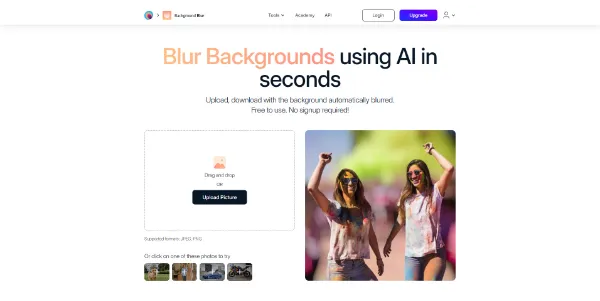
Backgrounds Blur is a photo editing tool designed for individuals who want to enhance their images by blurring the background, making the subject stand out. It is ideal for photographers, social media enthusiasts, and anyone who wants to add a professional touch to their photos. The tool utilizes advanced AI algorithms to automatically detect the main subject in an image and allows users to adjust the blur effect to achieve the desired level of depth of field. With Backgrounds Blur, users can transform ordinary pictures into captivating masterpieces with just a few simple steps. The tool is perfect for enhancing portraits, product shots, landscapes, and any other type of photo. Whether you're a professional or an amateur, Backgrounds Blur provides an easy-to-use interface to refine your images and make them stand out. By using Backgrounds Blur, users can take their photography to the next level and achieve breathtaking visual effects. The tool is particularly useful for those who want to create professional-looking photos without the need for expensive equipment or extensive photography experience.

Art Assistants Personnels Avatars
Features
Automatic background blur
The tool uses AI to automatically detect the main subject in an image and blur the background, allowing users to adjust the blur effect to achieve the desired level of depth of field.
Adjustable blur intensity
Users can adjust the level of blur to suit their photo, with the option to increase or decrease the intensity of the blur for the desired effect.
AI-assisted selection
If the automatic AI selection is not satisfactory, users can refine the subject selection using an AI-assisted selection tool, allowing for more precise control over the editing process.
Support for various image formats
Backgrounds Blur supports images in popular formats, including JPG, JPEG, PNG, HEIC, WEBP, and TIFF, making it easy to work with a wide range of image types.
Verdict
Best forTeams doing Art work who need consistent output without a steep learning curve.
Skip ifYou only need this once or twice; the subscription cost won't pay off for occasional use.
Easy to use: Backgrounds Blur provides an intuitive interface that makes it easy for users to edit their photos and achieve professional-looking results, even for those without extensive photography experience.
Fast editing: The tool allows users to edit their photos quickly, with the option to adjust the blur effect and download the edited image in just a few steps, saving time and effort.
Professional results: Backgrounds Blur enables users to achieve professional-looking results, with the ability to adjust the blur effect and refine the subject selection for stunning visual effects.
Limited control over AI selection: While the AI-assisted selection tool provides more control over the editing process, some users may find that the automatic AI selection is not always accurate, requiring manual refinement.
Dependence on AI: The tool's reliance on AI may lead to inconsistent results, particularly if the AI algorithm is not able to accurately detect the main subject in an image, requiring user intervention.
Alternatives
ToolPricingUpvotesRating
Read AI Freemium ▲ 112 3.7
BigIdeasDB Freemium ▲ 315 3.5
Juice AI Freemium ▲ 280 4.1
Frequently Asked Questions
Backgrounds Blur is a photo editing tool that uses AI to automatically detect the main subject in an image and blur the background, allowing users to adjust the blur effect to achieve the desired level of depth of field. The tool provides an easy-to-use interface and supports various image formats, making it easy to work with a wide range of image types.
Yes, Backgrounds Blur offers a free version with limited resolution downloads, but it also offers a PRO plan with additional features and high-resolution downloads.
Yes, Backgrounds Blur is ideal for product photography, allowing users to create professional-looking product shots with a blurred background, making the product stand out and enhancing the overall visual appeal.
You can adjust the blur intensity in Backgrounds Blur by using the adjustable blur intensity feature, which allows you to increase or decrease the intensity of the blur to achieve the desired effect.
The system requirements for using Backgrounds Blur are not specified, but the tool is available on iOS and Android apps, as well as on the MagicStudio website, making it accessible on a wide range of devices.
Reviews
📝
No reviews yet
Be the first to share your experience with Backgrounds Blur.
Submit a Review

Your email address will not be published. Required fields are marked *

Backgrounds Blur
Backgrounds Blur
Freemium
Visit Site ↗
Home Prompts