📂 Art 👁 3.6k views 🕐 June 1, 2026

insMind Image to Video

insMind Image to Video is a free AI tool designed for individuals.

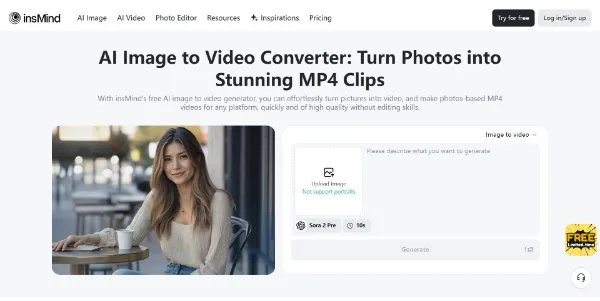
insMind Image to Video is a free AI tool designed for individuals and professionals looking to turn their photos into stunning video clips. It is suitable for those with no experience in video editing, as it allows users to upload images, set their ideas, and download 4K MP4 videos. The tool supports various image formats, including JPG, PNG, and WEBP, making it easy to create videos from photos.
The insMind Image to Video tool works by allowing users to upload their photos, enter a prompt, select the mode, length, and strength, and then click generate to let the AI create the video. The AI engine instantly turns the photos into a seamless video, adding transitions, effects, and more. The tool also offers various AI video styles, such as Mermaid, Hug, and Kiss, allowing users to be more creative with their videos.
insMind Image to Video is particularly useful for social media creators, marketers, and educators who want to create engaging video content from their photos. It helps them to create dynamic slideshows, social posts, or marketing clips without requiring any editing skills. The tool is also useful for personal projects, such as creating video slideshows from travel photos, wedding albums, or birthday memories.

Art Avatars Best AI Video Tools
Features
Upload images
Users can upload their photos in various formats, including JPG, PNG, and WEBP.
Enter prompt and select mode
Users can describe their idea, pick animation strength, video length, and style, and the AI will adjust automatically.
AI video generation
The AI engine instantly turns the photos into a seamless video, adding transitions, effects, and more.
Download and share
Users can download their MP4 video or share it directly to social media platforms like TikTok, Instagram, or YouTube.
Verdict
Best forTeams doing Art work who need consistent output without a steep learning curve.
Skip ifYou only need this once or twice; the subscription cost won't pay off for occasional use.
Easy to use: The tool is designed for individuals with no experience in video editing, making it easy to use and navigate.
Free: The insMind Image to Video tool is free to use, allowing users to create stunning video clips without incurring any costs.
Fast video generation: The AI engine generates videos quickly, allowing users to create and share their content in a short amount of time.
Limited customization options: The tool has limited customization options, which may not be suitable for users who want more control over their video content.
Dependence on AI: The tool's reliance on AI may result in inconsistent video quality, depending on the complexity of the input images and the chosen style.
Alternatives
ToolPricingUpvotesRating
Read AI Freemium ▲ 112 3.7
BigIdeasDB Freemium ▲ 315 3.5
Lumiere3D Freemium ▲ 257 4.5
Frequently Asked Questions
insMind Image to Video is a free AI tool that turns photos into stunning video clips. It allows users to upload images, set their ideas, and download 4K MP4 videos.
The tool works by allowing users to upload their photos, enter a prompt, select the mode, length, and strength, and then click generate to let the AI create the video.
The tool is useful for social media creators, marketers, and educators who want to create engaging video content from their photos. It can be used to create dynamic slideshows, social posts, or marketing clips.
Yes, insMind Image to Video is free to use, with options to top up credits when needed.
The tool has limited customization options, and its reliance on AI may result in inconsistent video quality, depending on the complexity of the input images and the chosen style.
Reviews
📝
No reviews yet
Be the first to share your experience with insMind Image to Video.
Submit a Review

Your email address will not be published. Required fields are marked *

insMind Image to Video
Freemium
Visit Site ↗
Home Prompts

