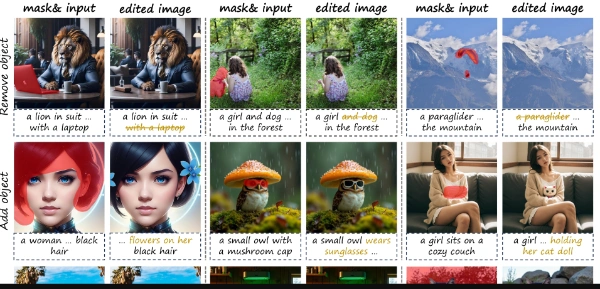
KV-Edit
KV-Edit is a training-free image editing tool designed for users who need.
KV-Edit is a training-free image editing tool designed for users who need to preserve the background of an image while making edits. It is particularly useful for those who require precise control over the editing process. KV-Edit achieves this by preserving the key-value pairs of the background, allowing for seamless integration of new content.
The tool works by implementing a KV cache in a DiT-based generative model, which stores the key-value pairs of background tokens during the inversion process and concatenates them with foreground content during denoising. This approach enables KV-Edit to maintain background consistency while generating new content.
Professionals and individuals who frequently edit images and require high-quality, precise background preservation will get the most value from KV-Edit. This includes graphic designers, photographers, and digital artists who need to make intricate edits to images without compromising the background.
| Tool | Pricing | Upvotes | Rating |
|---|---|---|---|
 Read AI
 |
Freemium | ▲ 112 | ★ 3.7 |
 BigIdeasDB
 |
Freemium | ▲ 315 | ★ 3.5 |
 Juice AI
 |
Freemium | ▲ 280 | ★ 4.1 |