📂 Avatars 👁 3.8k views 🕐 June 7, 2026

PDF Candy Editor

PDF Candy Editor is an online tool designed for individuals and businesses.

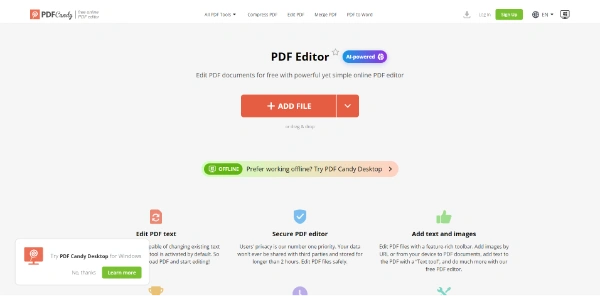
PDF Candy Editor is an online tool designed for individuals and businesses looking to edit PDF documents without the need for extensive software installations. It allows users to add text and images to PDFs, highlight and annotate important sections, sign PDFs, and much more, all while preserving the original layout and ensuring secure processing with end-to-end encryption. PDF Candy Editor is particularly useful for professionals who regularly work with PDFs, such as lawyers, educators, and business owners, as it provides a straightforward and efficient way to manage and modify PDF documents. Its AI-powered features also make it an excellent choice for those looking to boost productivity and streamline their workflow.

Avatars Business Ai Data Analytics
Features
PDF Text Editing
Allows users to change or add text and adjust formatting, including setting new font size, color, and alignment, and correcting typos instantly.
Image Addition
Enables users to drop in new images from their device or by URL and format them seamlessly with the easy-to-use toolbar.
PDF Signing
Allows users to add a signature anywhere in the document, either by drawing it by hand, uploading an image, or typing the name to create a styled version.
Annotation and Highlighting
Supports highlighting or underlining important parts, crossing out text, and sketching freehand, making it perfect for reviewing reports or marking up contracts.
Verdict
Best forTeams doing Avatars work who need consistent output without a steep learning curve.
Skip ifYou only need this once or twice; the subscription cost won't pay off for occasional use.
The tool offers a free version with a wide range of features, making it accessible to individuals and small businesses.
It provides secure processing with end-to-end encryption, ensuring that users' files are protected and deleted from the servers within 2 hours.
The AI-powered features significantly boost productivity by automating tasks such as translation, rewriting, and summarization.
The free version has a file size limit of 50 MB, which might not be sufficient for larger documents or high-resolution images.
While the tool is user-friendly, the navigation and available features might seem overwhelming to some users, particularly those without prior experience with PDF editing software.
Alternatives
ToolPricingUpvotesRating
Read AI Freemium ▲ 112 3.7
BigIdeasDB Freemium ▲ 315 3.5
Juice AI Freemium ▲ 280 4.1
Frequently Asked Questions
PDF Candy Editor is an online tool that allows users to edit PDF documents by adding text and images, highlighting and annotating, signing PDFs, and more. It works through a user-friendly interface where users can upload their PDF, make the desired changes, and then download the edited document.
Yes, PDF Candy Editor offers a free version with a range of features. However, it has limitations such as a 50 MB file size limit. For more features and larger file sizes, users can opt for the paid Desktop + Web Yearly plan.
Yes, PDF Candy Editor allows users to add a signature to their PDF documents. Users can draw their signature by hand, upload an image of their signature, or type their name to create a styled signature.
PDF Candy Editor provides secure processing with end-to-end encryption. Additionally, files are deleted from the servers within 2 hours after editing, ensuring the privacy and security of users' documents.
Alternatives to PDF Candy Editor include other online PDF editors and desktop applications that offer similar features. However, PDF Candy Editor stands out with its user-friendly interface, AI-powered features, and secure processing.
Reviews
📝
No reviews yet
Be the first to share your experience with PDF Candy Editor.
Submit a Review

Your email address will not be published. Required fields are marked *

PDF Candy Editor
PDF Candy Editor
Freemium
Visit Site ↗
Home Prompts