📂 Art 👁 2.7k views 🕐 May 24, 2026

HeyPhoto

HeyPhoto is a free AI photo editor designed for individuals looking to.

HeyPhoto is a free AI photo editor designed for individuals looking to make quick and easy edits to their photos, particularly faces. It allows users to change faces online, making smiling faces, changing hairstyles, adding emotions, makeup, and editing age in just a few clicks. HeyPhoto is intuitive and requires no special skills, making it accessible to a wide range of users.
HeyPhoto works by using artificial intelligence to detect faces in photos and make changes depending on the selected tool. The service securely stores uploaded images, allowing for quick access when needed, and users can delete them at any time. For better results, HeyPhoto recommends using quality photos with people directly facing the camera.
HeyPhoto is particularly useful for social media enthusiasts, online daters, and individuals looking to enhance their personal brand. It provides a simple and free way to edit photos without needing extensive photo editing experience, making it an ideal tool for those who want to make a good impression online without spending a lot of time or money on professional photo editing software.

Art Avatars Business Ai
Features
Change Faces
HeyPhoto allows users to change faces online, making smiling faces, changing hairstyles, and adding emotions in a few clicks.
Tune Selfies and Group Photos
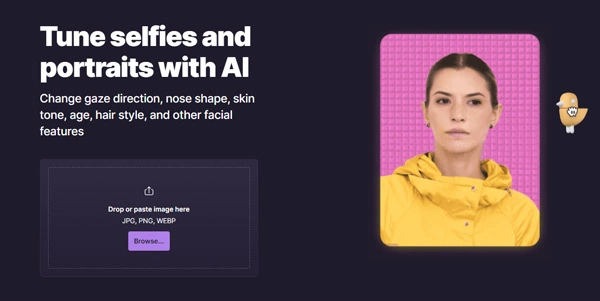
Users can tune selfies and group photos with AI, changing gaze direction, nose shape, skin tone, age, hair style, and other facial features.
Anonymize Me
HeyPhoto offers an 'Anonymize me' feature, which keeps user identity private and makes them invisible to face recognition systems.
Change Age
Users can change their age, meeting their future self or recapturing their youth.
Verdict
Best forTeams doing Art work who need consistent output without a steep learning curve.
Skip ifYou only need this once or twice; the subscription cost won't pay off for occasional use.
HeyPhoto is free to use, providing a cost-effective solution for photo editing.
The tool is easy to use and requires no special skills, making it accessible to a wide range of users.
HeyPhoto securely stores uploaded images, allowing for quick access when needed.
HeyPhoto puts a watermark on the resulting photos, which may not be ideal for commercial use.
The tool has limitations on image size, with a maximum of 5 MB and faces of up to 1024*1024 px in size.
Alternatives
ToolPricingUpvotesRating
Read AI Freemium ▲ 112 3.7
BigIdeasDB Freemium ▲ 315 3.5
Juice AI Freemium ▲ 280 4.1
Frequently Asked Questions
HeyPhoto is a free AI photo editor that uses artificial intelligence to detect faces in photos and make changes depending on the selected tool. It is easy to use and requires no special skills.
Yes, HeyPhoto is free to use, but it puts a watermark on the resulting photos.
HeyPhoto has limitations on image size, with a maximum of 5 MB and faces of up to 1024*1024 px in size. It also puts a watermark on the resulting photos.
While HeyPhoto can be used for commercial purposes, the watermark on the resulting photos may not be ideal. It is recommended to check the terms of service before using the tool for commercial use.
There are other AI photo editing tools available, such as Face Swapper and Face Generator, which offer similar features and capabilities. However, HeyPhoto is a free and easy-to-use option that is accessible to a wide range of users.
Reviews
📝
No reviews yet
Be the first to share your experience with HeyPhoto.
Submit a Review

Your email address will not be published. Required fields are marked *

HeyPhoto
HeyPhoto
Freemium
Visit Site ↗
Home Prompts

